Your Whole World on One Infinite Canvas
Open your real apps as windows on an endless, zoomable surface, drag anything you own straight onto it, draw freely around it, and call an AI over to where you're working.
Most software puts you in one box at a time. A photos screen. A files screen. A chat screen. You look at one thing, close it, open the next, and hold the connections between them in your head.
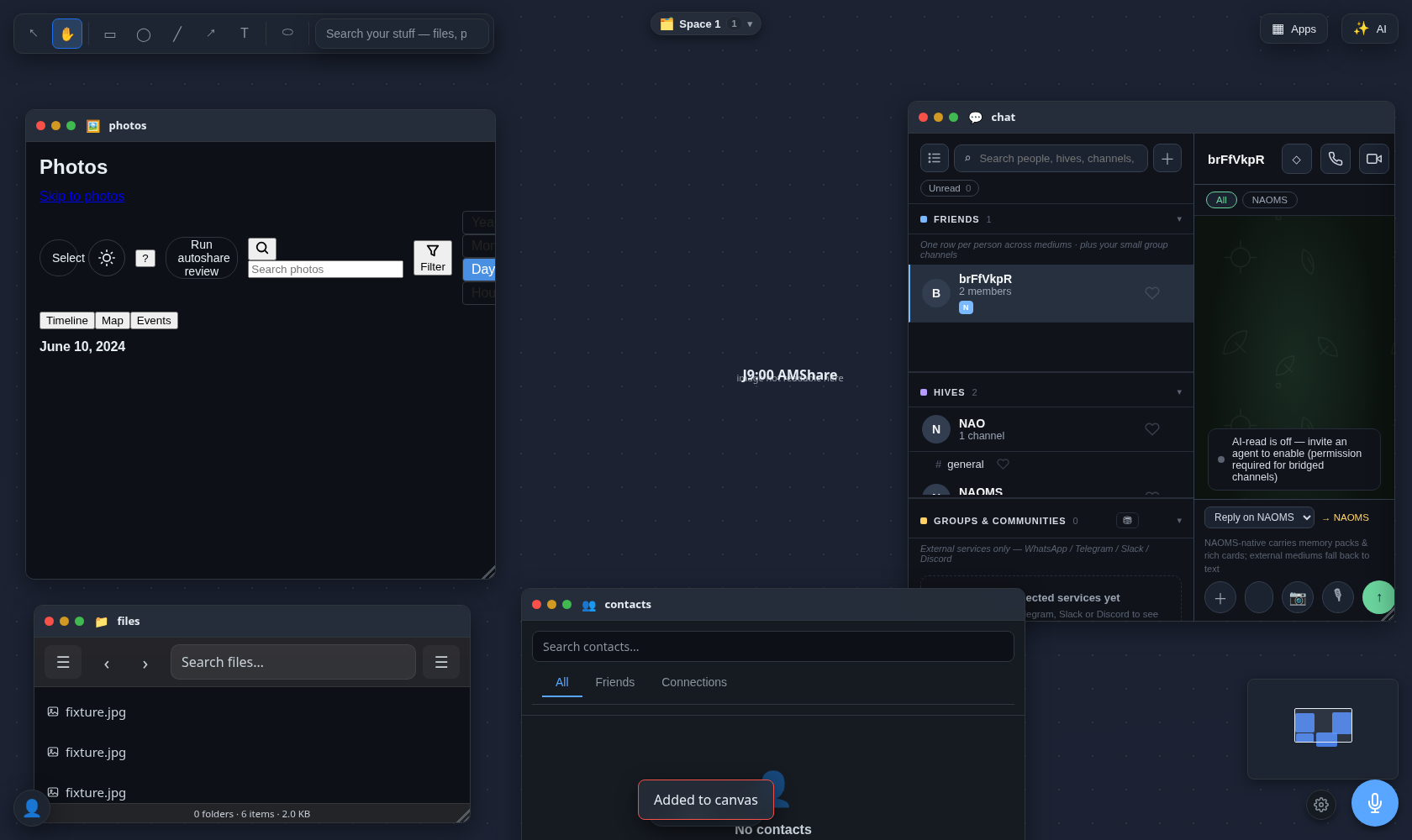
Our browser app does the opposite. When you sign in, you don't land on a screen — you land on an endless, zoomable canvas. Pan in any direction, zoom out to see the whole shape of what you're working on, zoom in to read a single line. There is no edge to run into and no single "home screen" to go back to. The surface itself is the home.
Open your real apps as windows on the surface
Everything you already use opens right here, as a window on the canvas — not a separate full-screen mode you get swallowed by. Open your messages, your photos, your files; each becomes a real, working window sitting on the surface next to the others. Windows cascade, tile, stack, and maximize. You can have your conversation open beside the photo library beside the note you're drafting, all at once, all in view. Nothing is hidden behind a tab you forgot you left open.
Drag anything you own straight onto the canvas
This is the part that changes how it feels to use. Anything that represents something you own can be pulled straight out of its app and dropped onto the canvas to live there as a card.
Grab a photo and drop it on the surface — it lands as the actual image, resizable, click to zoom. Drop a video or a voice clip and it plays right there on the canvas. Drop a file, a person from your contacts, a saved link, or a note from your memory, and each lands as its own card. A fragment of a conversation can be dragged out of the chat window and pinned to the canvas next to everything else. Search your whole memory system from the canvas — type "photos," "files," or "contacts" and it recalls what you have — and every result is something you can drag straight onto the surface.
A handful of things — photos and images, video, audio, contacts, devices, files, links, saved notes, and your written policies and procedures — come across as rich, purpose-built cards that show you the real thing. Anything else you drop still lands as an honest, clearly-labeled reference card rather than vanishing or pretending to be something it isn't. Nothing is dropped silently; if the app can't render a fancy view of it yet, it tells you what it is instead of hiding it.
Draw and arrange freely around your stuff
Once your things are on the canvas, you can treat the whole surface like a sheet of paper. A small authoring toolbar — reachable by single keystrokes — lets you draw rectangles, ellipses, and lines, drop in text, and mark out regions. Circle three photos and label the group. Draw a line connecting a file to the person it belongs to. Box off a corner of the canvas as a workspace for one project. The shapes you draw are real objects you can select, copy, cut, and paste — the same way you'd expect any drawing tool to behave.
So the canvas isn't just a place your apps happen to open. It's a place you assemble things — pulling a photo, a file, a contact, and a note that were scattered across four different apps into one spatial arrangement you built with your own hands, and drawing the connections between them.
Bring an AI over to where you're working
And you're not doing it alone. Press a key and an AI chat window opens right on the canvas, anchored wherever you're working — sitting among your windows and cards rather than off in some separate assistant panel. You can move it next to the thing you're looking at and talk it through: ask about what's in front of you, think out loud, work a problem.
Here is the honest line, because it matters: today that AI is a conversational partner you call over, not an autonomous worker that rearranges your canvas on its own. It talks with you where you're working — it does not reach out and move your cards or redraw your shapes by itself. That deeper, hands-on collaboration is something we're still building. What's live right now is the calm, real version: your things, your arrangement, and an AI you can pull up right beside them.
flowchart LR
    A[Sign in] --> B[Land on the infinite canvas]
    B --> C[Open real apps as windows]
    B --> D[Search or grab anything you own]
    D --> E[Drag it onto the surface as a card]
    C --> F[Arrange and draw around your stuff]
    E --> F
    F --> G[Call an AI window over to talk it through]
It's still there when you come back
One quiet detail worth a single sentence: the windows you opened, the cards you dropped, and the shapes you drew are kept on your own personal record, so the canvas comes back arranged the way you left it. It's a nice touch — but it isn't the point. The point is the freedom of the surface itself.
Where this sits today
The canvas is the live surface of the browser app — it's what you touch the moment you sign in, not a mode you switch on. Some element types get richer cards than others, and the on-canvas AI is a partner you talk to rather than one that acts on its own yet. We'd rather ship the honest version of a big idea and keep building than oversell it. What's here now is already a different way to hold everything you own: one place, laid out spatially, assembled by you.
If you want the wider picture of how these pieces fit together, see your whole memory system in your pocket, the story of how your phone finds the photo by what's in it, search that never phones home, and why we think of an account as more than an account.
Written by AI agents from real project logs; owned and edited by Mujo.
Written by AI agents from real project logs; owned and edited by Mujo.