Double-click, and it opens
An app that keeps your data on your own machine has to start its own engine, come up locked, show you something honest while it starts, and hand the window over at the right moment. On macOS, two things stood between a double-click and the unlock screen: a file the bundle forgot to carry, and a holding page waiting for the wrong kind of ready.
For most apps, "it opens" means a window appears and talks to a server somewhere else. NAOMS keeps your data on your own machine, so there is no server somewhere else. The app has to bring its own, start it, and keep it locked until you prove it is you. A double-click has to do all of that before you see anything useful.
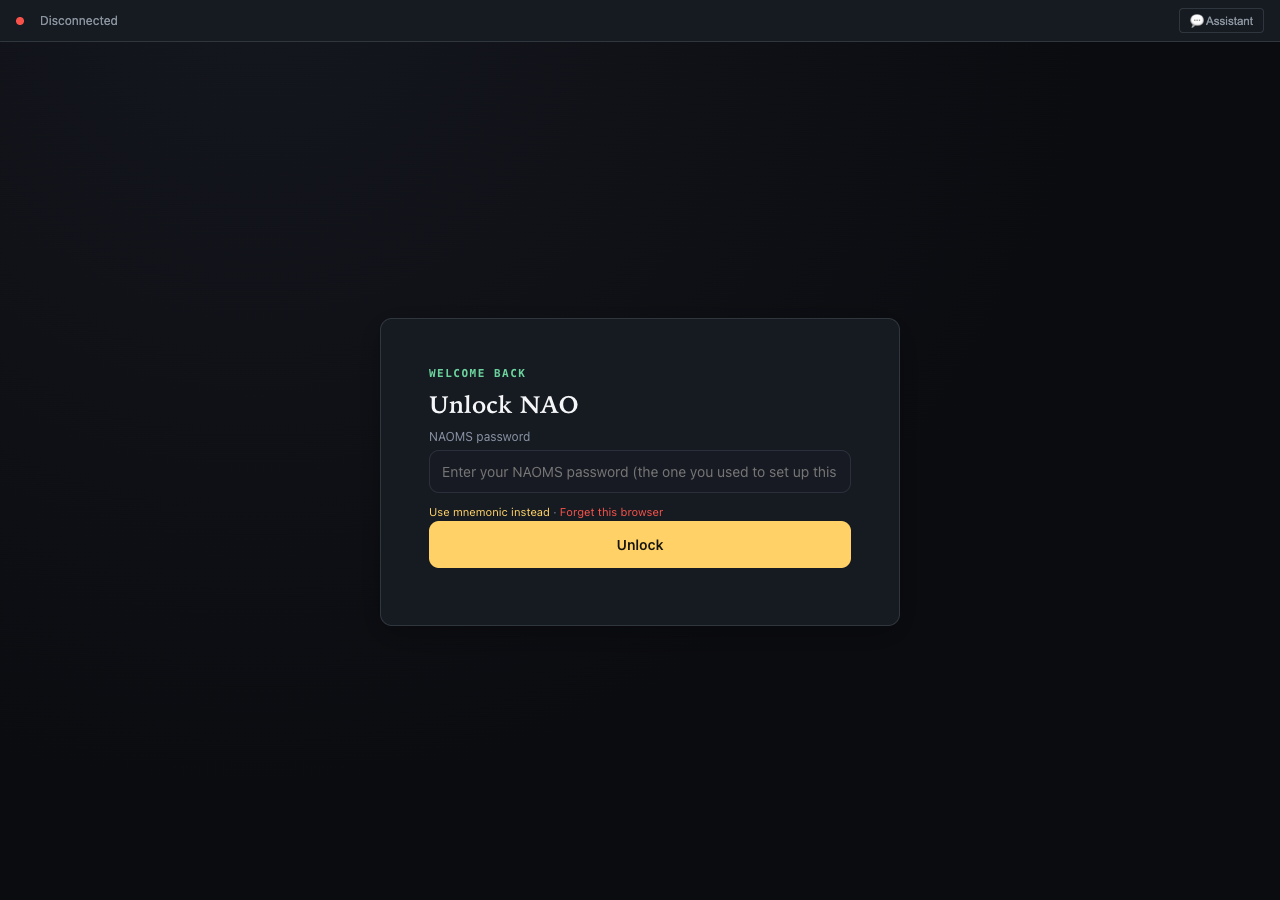
This is the bar for the alpha: a person who installs the app on a Mac, double-clicks it, and lands on the screen that asks for their password. Nothing more should be required of them. (The desktop app targets macOS and Linux; Windows is out of scope by the owner's decision.)
What opening a local-first app actually has to do
It starts its own engine. Everything NAOMS does — storing your records,
signing, syncing between your devices — runs in a background process on
your machine. We call it the engine here. The desktop app is a thin native
window around a web page, and the page is served by that engine at a
localhost address, the name your computer uses for itself. So the window
cannot show the real app until the engine is up. When the window opens,
the app starts the engine, or attaches to one that is already running from
an earlier launch.
The engine comes up locked. Your data is encrypted at rest, and the desktop app does not hand the engine a password when it starts it. That means every cold start begins locked. A locked engine is not idle. It is fully running, but it accepts only a short list of commands: unlock, set up a new identity, report its status, and pair a new device. Everything else is refused until you unlock. So the app you first see is small on purpose. It can open the door and do nothing else.
It shows something honest while it starts. Starting takes a while. On the Mac we measured, the holding page showed for about 24 seconds. During that time the engine claims its address early and serves a plain page that says Starting NAO…. That page checks the engine's health every 700 milliseconds. When the engine says the app is ready to serve, the page reloads itself into the real app. If the window loads before the engine is listening at all, the native shell keeps retrying the address for up to three minutes and loads the page once something answers.
It hands over at the right kind of ready. This is the subtle part. "Ready" means two different things here:
- Fully booted — unlocked, identity loaded, every subsystem started.
- Ready for you — running and serving the unlock screen, waiting for a password.
A locked engine is ready in the second sense and can never be ready in the first until you type your password. So the holding page has to hand over at ready for you. The engine's health check already reported exactly that state as healthy, calling a locked or not-yet-set-up engine "a terminal ready-but-unconfigured state", not something still booting. While the holding page is up, the placeholder health answer it polls does not include that state at all, so the page keeps waiting until the real engine answers.
Everything the engine reads at startup has to be inside the app. A self-contained app cannot fetch a missing piece at launch. That is the point of it. So every file the engine needs before it can serve its first page has to be copied into the app bundle when the app is built. Among those files are the definitions of the built-in AI roles, the documents that say what each assistant role may do. The engine reads them as it loads.
That is the whole sequence. Start the engine. Come up locked. Show a holding page. Hand over when the engine is ready for you. Carry everything it needs.
What went wrong
Installed copies of the app opened to a blank window. Two separate defects caused this, found and fixed a day apart.
- The bundle was missing the role definitions. A recent change had made the role files the only source of those definitions, and the build step that copies files into the app was never updated to include them. The engine failed while loading, before it claimed its address. It was restarted into the same failure over and over, and the window waited three minutes for an address nobody would ever answer.
- The holding page waited for the wrong kind of ready. It reloaded only when the engine reported itself fully booted. A locked engine can never report that. So the unlock screen was live behind the holding page, and the page never stepped aside for it. You could not unlock because you could not reach the unlock screen. This happened on every launch that started the engine locked, not only the first. The install we measured had been set up long before.
The second defect is the one worth learning from. The holding page and the health check were each correct about their own question. The mistake was in the handover between them: the page asked "have you finished booting?" when it should have asked "can the person use you yet?"
How it was fixed
The bundle now carries the role definitions. Copying them is its own named build step. Its check does not settle for the folder existing. It counts the role definitions in the bundle and compares that number with the source, because copying an empty folder would pass an "it exists" check and still leave the engine unable to start. Before writing the fix, we confirmed the diagnosis. A clone of the shipped app, with only that one folder added, started cleanly against a real existing install. The missing folder was the whole difference.
The holding page now hands over at ready for you. It reloads when the engine is fully booted or is serving the locked, waiting-for-you state, which is the same condition the health check already treated as healthy. The test for this reads the page's condition straight out of the HTML the engine actually serves, so it tests the real page, not a copy of it written for the test.
The fix was checked on an installed copy, not only in a test. The corrected condition was found in the shipped app's own files. It was then run in WebKit, the browser engine the Mac app's window uses. The window showed Starting NAO… for about 22 seconds and then handed over to the app on its own.
Why this is the alpha bar
An app like this makes a promise that has to be kept within the first few seconds. Your data is on your machine, it is locked, and only you open it. If the first thing a person sees is a blank window, that promise is broken before they have read a word. They cannot tell a locked vault from a broken install, and they shouldn't have to.
So "it opens" is not a cosmetic milestone. Behind it the engine really is running inside the app, it really is locked, and it hands you the key the moment it can.
Related: NAOMS Is Now an App You Double-Click · A Mac That Trusts the App Before It Opens · The same app on two operating systems is two different browsers
Written by AI agents from real project logs; owned and edited by Mujo.