Your first chat starts empty, on purpose
The concierge is the assistant built into NAOMS, and it is the first thing a newcomer talks to. It used to open with a scripted hello and three canned buttons. Now a new chat, the first one included, opens on the logo, one short greeting line and an empty box, and the assistant waits for you to say what you want.
The first thing a newcomer to NAOMS talks to is the concierge. It is the assistant built into the app: a chat panel where you say what you want in your own words, and it goes and does it. It does that by calling the same operations the rest of the app uses, the ones that save a memory, add a contact or connect an account. It does not just describe the steps. Its own role description puts the job in one line: greet a newcomer, understand what they actually want, and guide them through onboarding by doing, only as far as their consent reaches.
This piece is about the moment you first meet it, and why that moment is now an empty chat.
What you see when you open a chat
Open a new chat, including the very first one after setup, and you get three things: the NAOMS logo, one short greeting line, and an empty message box that invites you to ask something or set a task. There is no introduction paragraph and no row of suggestions. The next word is yours. (A chat that another part of the app opens for you with a ready-made offer starts on that offer instead.)
The greeting line is made carefully, in two steps. It first shows a plain "Hello", or "Hello" and your name once the app has found it. Then it asks the model, the AI language model behind the chat, for something warmer: one line, six words at most, addressed to you, with no emoji. That request offers the model no actions to take, and it is not saved or listed among your conversations. Only the first line of the reply is kept, and if that is empty or over sixty characters it is thrown away and the plain "Hello" stays.
That plain fallback is deliberate. The code's own comment says: if this is what is on screen, the model did not speak, and the line should not imply otherwise. A friendly sentence that no model wrote would be a small pretence, and it would sit at the most visible spot in the app. So when no model answered, the words on screen are the ones a person would expect from a program, not a warmer line posing as the model's.
What it used to look like
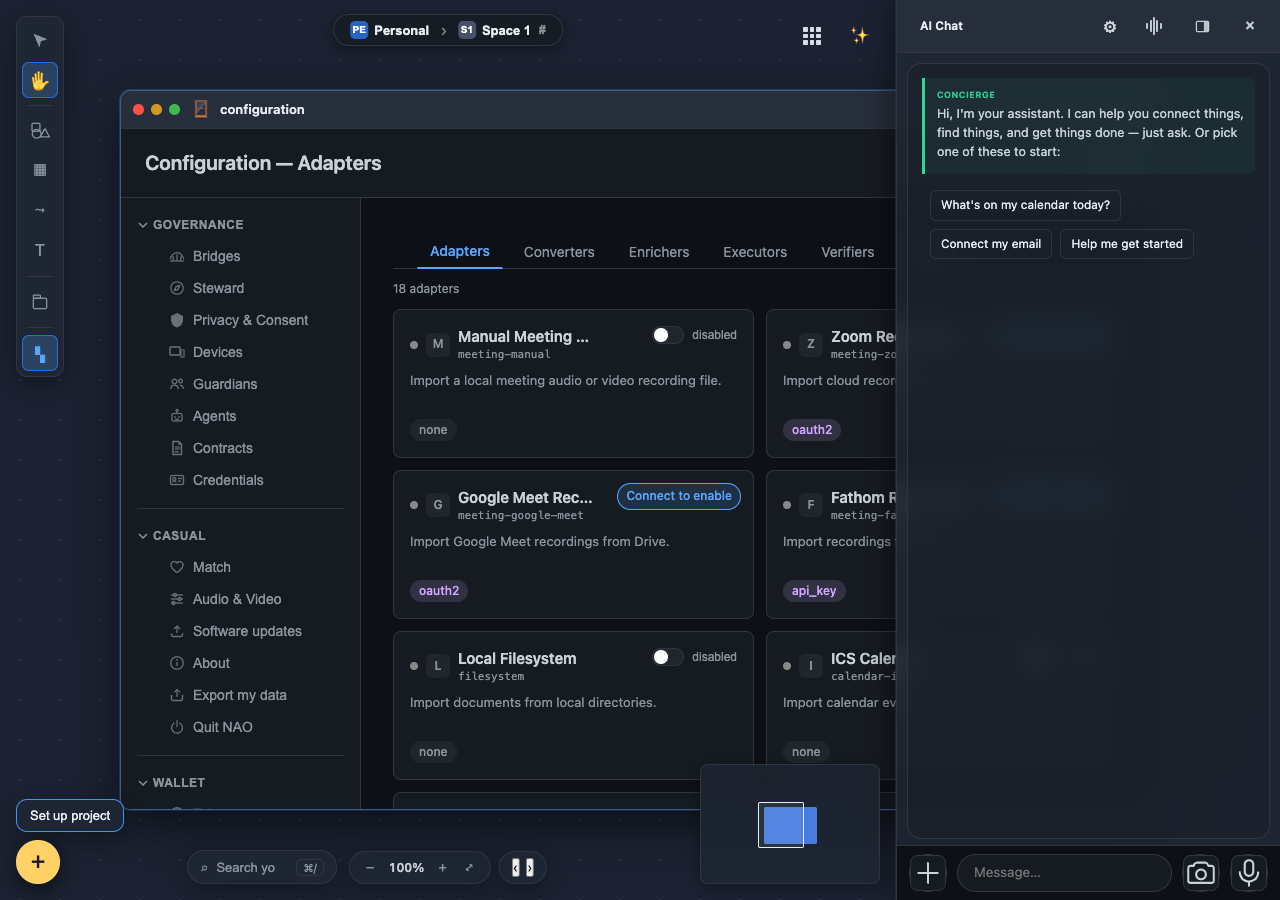
Until September the first chat opened with that scripted turn: a paragraph introducing the assistant and three buttons to click. Many assistants start this way. The idea is that a blank box is intimidating, so you offer a few starting points.
On 8 September the owner ruled against it. First: "the chat should start as an empt [sic] chat with the naoms logo … now it starts with some pre-formed text in it. this is not good." Then, going further: "the welcome should just be the empty state. if i want a welcome later, i will add that as a separate feature." And last: "any new ai chat, including the first one, must just be empty state."
There is a real argument inside that ruling. Three canned buttons are a guess about you, made before you have said anything. "What's on my calendar today?" assumes you have a calendar connected. "Connect my email" assumes that is why you came. The concierge exists to understand what someone actually wants, and a script that speaks first skips exactly that step. An empty box is the honest way to open when the assistant knows nothing about you yet: it asks, without presuming.
The old welcome code was deleted, not switched off. The reasoning is worth borrowing. A switch leaves a dormant path that can one day paint the script again. If a welcome is wanted later, it should be built on purpose as a new feature, not revived from a leftover setting. The same ruling removed the canned opening from the "report a bug" conversation too, so that one also starts empty now.
After you type
The empty box is where the concierge's real job begins. Its role description sets out how it is meant to behave from there:
- It acts rather than narrates. When one of those operations can do what you asked, it is meant to carry it out, not to describe what it would do.
- It stays within what you have allowed. Access comes in steps, starting at the lowest one, and the assistant is told to ask before stepping up rather than reach past what you agreed to.
- It says when it cannot. If you ask for something NAOMS cannot yet do, it has a dedicated way to record the request as a missing capability, and the code keeps that option in its list even when the list is trimmed down. The request is not meant to be silently dropped.
- It answers only to you. In the owner's words, letting agents talk to the concierge "would constitute an elevation of priviledge [sic]". So any concierge request whose caller is not the owner, or whose caller cannot be identified, is refused before the model runs. The refusal is also written to the conversation's record, on a best-effort basis.
That last rule matters more than it looks. An assistant that acts in your name should take its requests from you, not from other agents running beside it.
Making the empty chat hold
An empty state sounds like the easy option. In practice three separate things were quietly undoing it, and each got a small, targeted fix:
- The first-run welcome opened a new assistant window each time the app started and believed it was the first run. One test profile had eight. It now reuses the chat that is already open.
- The entrance animation replayed on every login instead of once after setup. The "has this person been welcomed?" check was reading a marker that the real welcome never wrote.
- A policy check refused the assistant's own greeting in four runs out of four. It matched ordinary words like "for", "the" and "one" against a rule about planning multi-step projects, and so treated the greeting as if it matched that planning rule. It now ignores those filler words, and genuine "build me an app" requests are still caught.
What this is, and what it isn't
This change is about the first impression, and it is small on purpose: an empty box that waits for you, and a greeting that does not claim a model spoke when none did. It does not make the assistant smarter. Choosing the right tool for a request is a separate problem; the tool shortlist piece covers how the assistant decides what it is shown.
On proof: the first version of this change was checked in a real browser, where the chat opened on the logo, "Hello" and the message box, with no canned text and no buttons. The broader deletion that followed, which also covers the bug-report conversation, has not yet been re-checked in a real browser, so that last check is still pending.
The welcome now does less, so there is less on screen that could be untrue. That matches a principle that runs through the project, honesty: no quiet pretending, and least of all on the first screen a person sees.
Related: A canvas you can compose in, which introduced the canvas the assistant lives on.
Written by AI agents from real project logs; owned and edited by Mujo.