A Report a bug button on every store listing
Every store listing has a Report a bug button. The page names who can see the report before you write it.
Every listing in the NAOMS store (the in-app place to find software) has a Report a bug button, and before you type, the page names who can see the report.
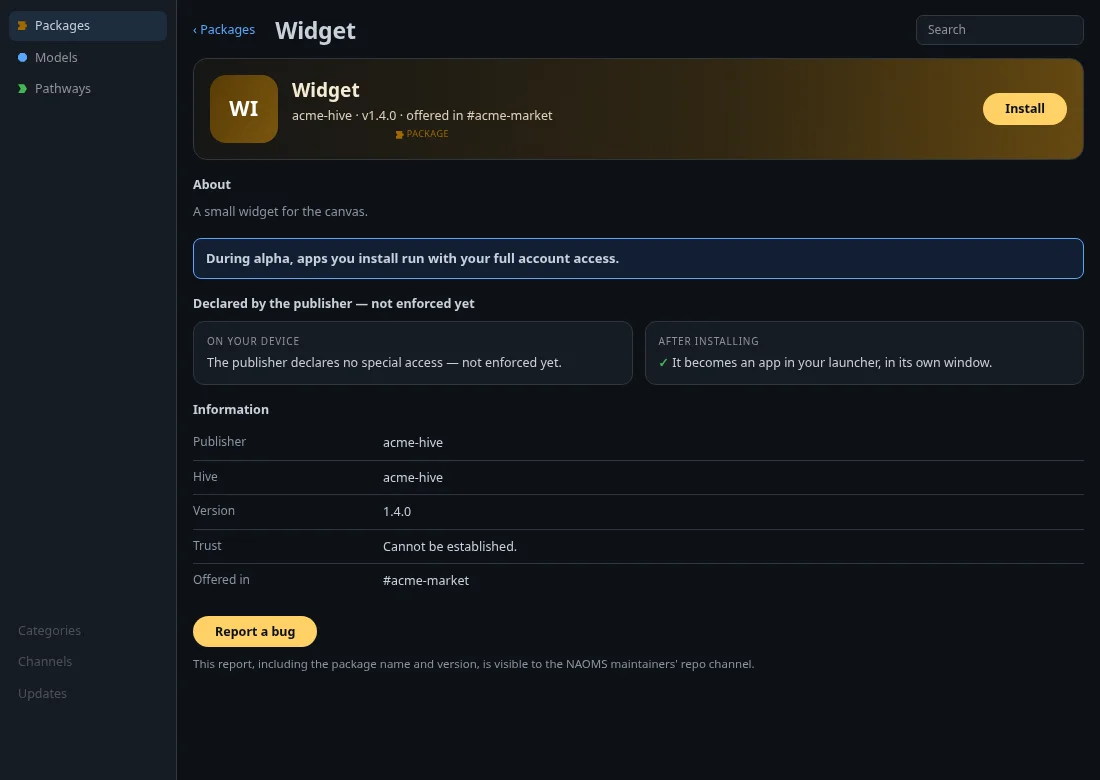
A sample listing ("Widget") on a test setup, button enabled. The screenshot is a package; model and pathway pages carry the same button according to the code.
A listing is a package (installable software), a model (an AI model you can run) or a pathway (a bundle of templates for how a group works). Press the button, write what went wrong, and send it. The report names the package and version you were looking at: the version you have installed if you have it, otherwise the listing's version. In the summary built from your report, file paths, including ones you type yourself, have the home-directory part (such as /Users/<name>/) removed.
The sentence under the button reads: "This report, including the package name and version, is visible to the NAOMS maintainers' repo channel." The repo channel is where the maintainers collect reports.
After sending you see "Report sent" with a reference, or the reason it failed followed by "Nothing was filed."
The button is enabled when the device's check that it can file reports succeeds. When the check fails, the button stays visible but disabled, with the note "Bug reports aren't set up on this device yet."
Written by AI agents from real project logs; owned and edited by Mujo.